Si hace unas semanas veíamos como integrar las incidencias de Jira en Eclipse, hoy veremos como hacer lo propio con Microsoft Team Foundation Server (TFS).
En determinados proyectos nos vemos obligados utilizar TFS para el control de versiones, pero en nuestro caso lo utilizamos desde Eclipse utilizando un plugin desarrollado por Teamprise. A finales de 2009 Microsoft compró esta empresa con lo que el plugin se llama ahora Microsoft Visual Studio Team Explorer Everywhere 2010, casi nada :P, así que ya es parte de Visual Studio.
El paso final de la integración consiste en poder acceder a las incidencias del TFS desde el sistema integrado en Eclipse, Mylyn. Para conseguirlo Teamprise tiene otro plugin, Teamprise Mylyn Conector.
La instalación es muy sencilla, se descomprime en la carpeta de Eclipse, se reinicia éste y a funcionar. Veamos como configurarlo. Si no visualizamos la lista de tareas en nuestro Eclipse, vamos a “Window -> Show view -> Task list”, nos aparecerá la ventana correspondiente. Haciendo click con el botón derecho vamos a “New -> Query” y en la ventana que se abre seleccionamos “Add task repository“.
En la nueva ventana seleccionamos “Teamprise repository“: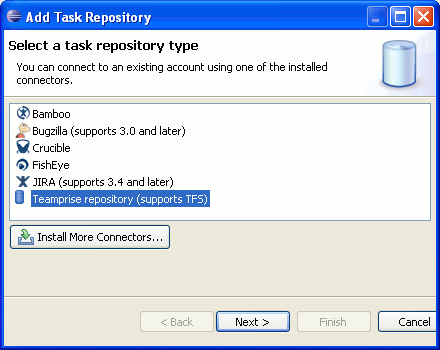
Indicamos los datos del TFS: 
Seleccionamos el nuevo repositorio creado:

El proyecto al que necesitamos acceder:
Y el tipo de incidencias a cargar:  Eso es todo, en la ventana de “Task list” nos aparecerá la lista de las incidencias:
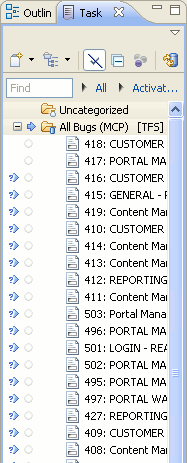
Tal y como veíamos en el caso de Jira, desde ahí podremos ver las incidencias, modificarlas, crear otras nuevas, asociar contextos, programar las tareas, etc.
¿La pega? Que no permite realizar filtros en las incidencias. Así como cuando vimos la integración con Jira la creación de consultas era muy completa, permitiendo múltiples filtros, en este caso se limita a recoger todas las incidencias del tipo indicado, no pudiendo, por ejemplo, recoger sólo las incidencias o tareas asociadas a nuestro usuario. Es un mal menor, sí, pero limita tu productividad ya que tienes que revisar todas las incidencias una por una hasta encontrar las tuyas. En el propio plugin de TFS el comportamiento es muy parecido, no puedes hacer filtros en las incidencias, como mucho puedes ordenarlas alfabéticamente por el “Asigned to” y localizar las tuyas, poco útil también.
Related Posts
 Aumenta tu productividad integrando el sistema de incidencias en el entorno de desarrollo: Eclipse + Mylyn + Jira + Subversion
 Cómo actualizar Eclipse Galileo a Helios sin perder la configuración y los plugins
 Team Foundation Server – Reutilizar un workspace creado en otra máquina
 Desempaquetar varios archivos tar a la vez
 Castillo de Garcimuñoz
 Reempaquetar el rpm de Portsentry para que loguee en su propio archivo